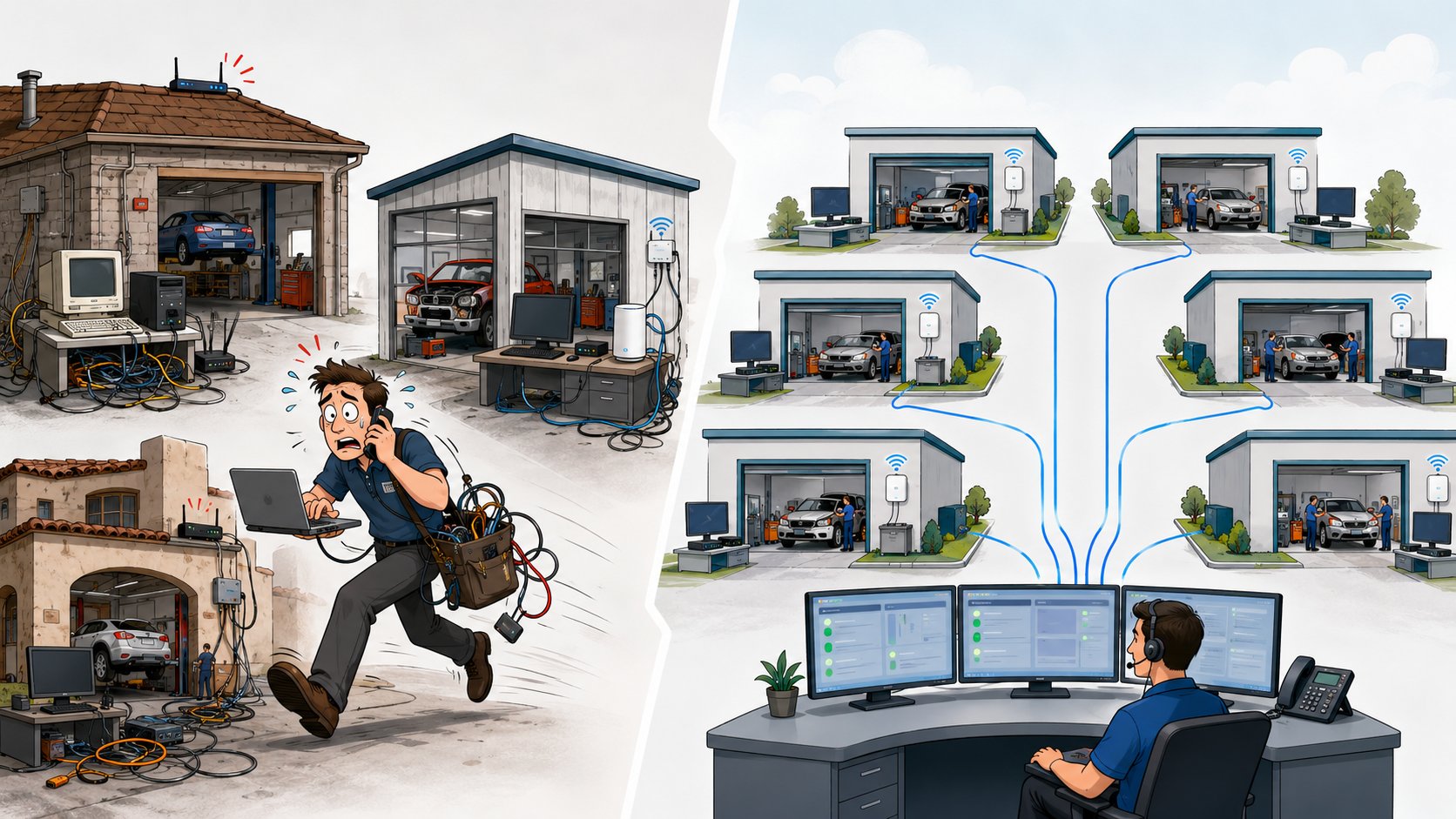
The amount of IT support a multi-location collision center needs is not determined by location count alone. A three-location organization with inconsistent technology may require more support than a ten-location group with standardized computers, networks, cybersecurity, and support processes.
A better way to determine support needs is to look at five factors: number of users and devices, how standardized the locations are, the complexity of the technology environment, how dependent production is on technology, and the level of support coverage the business expects.
The goal is not to put an IT person in every shop. It is to build a support model that keeps every location productive, secure, and consistent without adding unnecessary complexity as the business grows.
| Factor | Why It Matters |
|---|---|
| Users & Devices | More employees and devices create more support activity and more systems to manage. |
| Standardization | Consistent locations are easier and more efficient to support. |
| Technology Complexity | More applications, integrations, vendors, and specialized systems increase support demands. |
| Production Dependence | The more technology affects estimating, parts, communication, and repair workflows, the more important rapid support becomes. |
| Coverage Expectations | Business hours, after-hours needs, onsite support, and escalation requirements all affect the support model. |
1. Start With the Number of Employees and Devices
The number of employees still matters, but it should be viewed as only one part of the equation.
Each employee may rely on several pieces of technology throughout the day, including:
- Desktop or laptop computers
- Microsoft 365
- Estimating and repair applications
- Shared files
- Printers and scanners
- Mobile devices
- Phones
- User accounts and passwords
As the number of employees grows, so does the amount of day-to-day support activity.
New employees need accounts and equipment. Departing employees need access removed. Computers need updates. Passwords get reset. Software stops responding. Devices eventually fail.
A 20-person organization will naturally generate less support activity than a 100-person organization, but headcount still does not tell the whole story.
A highly standardized 100-user environment can often be easier to support than a 40-user business where every employee has a different computer, different software, and different processes.
The real question is whether the environment is organized in a way that allows support to scale efficiently.
2. Standardized Locations Require Less Support
Standardization has one of the biggest impacts on how much IT support a multi-location collision center needs.
Imagine two collision center groups.
The first operates three locations.
Each shop has different computers, different Wi-Fi equipment, different network hardware, different software versions, and different security settings.
The second operates eight locations.
Every shop follows the same technology standards. Employees have similar computers, networks are configured consistently, security policies are centralized, and support processes are the same across every location.
Even though the second business has more locations, it may be much easier to support.
Standardization allows an IT provider to solve problems faster because technicians already understand how each location is supposed to work.
It also allows improvements to be deployed consistently.
A security change can be applied across every location.
A new workstation can be configured using the same standard.
A new employee can follow the same onboarding process regardless of which shop they join.
As your collision center grows, standardization helps prevent every new location from becoming another unique IT environment.
That reduces support complexity and allows your technology team to support more locations without requiring a proportional increase in staff.
3. Technology Complexity Matters More Than Location Count
Two collision centers with the same number of employees can require very different levels of IT support.
One organization may rely primarily on Microsoft 365, CCC ONE, standard accounting software, cloud applications, and a well-managed network.
Another may have multiple servers, custom applications, complex integrations, specialized equipment, several internet providers, different phone systems, and a collection of legacy platforms that have accumulated over time.
The second environment will require more support even if the businesses are the same size.
Complexity often comes from:
- Multiple line-of-business applications
- On-premises servers
- Cloud services
- Application integrations
- Multiple internet providers
- Different phone systems
- Legacy equipment
- Custom workflows
- Multiple technology vendors
- Inconsistent security policies
This is why a simple formula like "one IT person for every X employees" is often misleading.
What matters is the amount of technology that needs to be supported and how complicated that environment is to manage.
A well-designed environment reduces support requirements.
A fragmented environment increases them.
4. Consider How Much Production Depends on Technology
For a collision center, IT support is not just about office productivity.
Technology supports the repair process.
Employees may rely on technology to:
- Write estimates
- Access repair procedures
- Upload photos
- Order parts
- Communicate with insurance companies
- Update customers
- Access shared files
- Process payments
- Review production reports
That means support requirements should reflect the impact a technology problem can have on production.
A password problem affecting one employee is inconvenient.
An internet outage affecting an entire location is operationally significant.
A multi-location IT support model should recognize that difference.
The most important questions are:
- How quickly does the business need critical issues acknowledged?
- What happens when an entire shop cannot work?
- Who coordinates with the internet provider or software vendor?
- Is after-hours support required?
- Can the provider escalate production-impacting issues immediately?
The more technology is integrated into the repair process, the more important it becomes to have a support model based on business impact rather than simply ticket volume.
5. Most Locations Do Not Need Their Own IT Person
One of the most common misconceptions about multi-location growth is that each shop eventually needs its own IT employee.
In most cases, it does not.
Modern business technology can be managed centrally.
A capable IT provider can remotely monitor computers, networks, servers, backups, cybersecurity, Microsoft 365, and many other systems across multiple locations from a single support operation.
Employees can contact one help desk regardless of which collision center they work from.
Onsite support can then be scheduled when physical work is actually required.
This might include:
- Replacing failed hardware
- Installing network equipment
- Troubleshooting physical cabling
- Setting up a new location
- Performing major infrastructure upgrades
Centralized support creates consistency.
Employees do not have to figure out which technician supports which shop.
Managers do not need to maintain separate IT relationships at every location.
Leadership gains one support process and one point of accountability across the organization.
For a well-standardized collision center group, adding another location should expand the existing support model rather than require building a new one.
6. How Much Onsite IT Support Does a Collision Center Need?
The answer depends on the environment.
Most day-to-day support issues can often be handled remotely, including:
- Password problems
- Microsoft 365 issues
- Software troubleshooting
- Printer configuration
- User account changes
- Application access
- Security alerts
- Routine system maintenance
Onsite support becomes necessary when someone needs to physically interact with equipment.
That may include replacing a computer, troubleshooting cabling, installing network equipment, or working on a local server.
A strong support model should not require someone sitting in every location waiting for a problem to occur.
Instead, it should combine fast remote support with reliable onsite assistance when needed.
This usually provides much broader coverage than relying on one technician who has to drive between locations every time an issue occurs.
7. Support Requirements Increase During Growth and Acquisitions
Normal day-to-day operations are only part of the support workload.
Growth creates additional technology work.
Opening a new location may require:
- Internet installation
- Network design
- Wi-Fi
- Computers
- User accounts
- Security
- Phones
- Vendor coordination
- Application setup
Acquisitions can create even more complexity because the new location may arrive with an entirely different technology environment.
During those periods, the business may temporarily need significantly more technology support than it does during normal operations.
That does not necessarily mean hiring permanent IT employees.
A scalable IT provider should be able to increase project resources during an expansion and then return to the normal support model after the location has been integrated.
That flexibility is one of the advantages of outsourced or co-managed IT.
8. When Does a Multi-Location Collision Center Need Internal IT?
Multiple locations alone do not create the need for an internal IT department.
Internal IT becomes more useful when the business develops enough ongoing internal technology work to justify a dedicated employee.
That may happen when:
- Technology projects are happening continuously.
- Leadership needs a dedicated internal technology coordinator.
- The organization uses highly specialized or custom systems.
- Multiple departments require constant technology planning.
- There is substantial internal reporting, application, or data work.
- Someone needs to manage technology initiatives every day.
At that point, the business may choose to hire an internal technology leader while continuing to use an outside provider for support, cybersecurity, infrastructure, and specialized expertise.
That creates a co-managed model.
A growing collision center can therefore move from fully outsourced IT to co-managed IT without abandoning the outside provider that supports the locations.
9. What Should IT Support Look Like Across Multiple Locations?
A strong multi-location support model should feel simple to employees even if the technology behind it is complex.
Employees should know:
- Who to contact when they need help
- How to submit a support request
- What happens when an issue affects production
- Who coordinates with outside vendors
- When onsite support will be provided
Behind the scenes, the IT provider should have visibility into every location.
That typically includes:
- Centralized monitoring
- Hardware inventory
- Network documentation
- Security policies
- Backup monitoring
- User management
- Vendor documentation
- Technology standards
- Lifecycle planning
Leadership should also have a consistent view of the entire organization.
Instead of managing technology one shop at a time, the business should be able to evaluate reliability, cybersecurity, hardware needs, and future investments across every location.
That is what allows IT support to scale.
10. Five Questions to Determine Whether Your Current Support Model Can Scale
Ask these five questions before assuming you need more IT staff.
1. Are Our Locations Standardized?
If every location operates differently, improving standardization may reduce support needs more effectively than adding staff.
2. Are Recurring Problems Being Eliminated?
If the same issues continue returning, the problem may be the support model rather than the amount of support available.
3. Can One Support Team See and Manage Every Location?
Centralized visibility makes multi-location support much more efficient.
4. Can Our Provider Handle Growth Projects Without Day-to-Day Support Suffering?
A scalable provider should have enough capacity to support expansion while continuing to serve existing locations.
5. Are Managers Still Acting as Technology Coordinators?
If leadership spends significant time calling internet providers, software vendors, and technicians, the business may need better ownership rather than simply more people.
If your current model performs well in these five areas, it may be capable of supporting considerably more growth than you expect.
Example: Why More Locations Do Not Always Mean More IT Complexity
Consider a collision center group with three locations that grew independently over several years.
Each shop uses different computers, network equipment, Wi-Fi, vendors, and support processes.
Employees regularly encounter different experiences depending on where they work, and technicians need to troubleshoot each location differently.
Now compare that with a ten-location group where every shop follows the same technology standards.
Computers are configured consistently.
Networks follow the same design.
Security policies are centrally managed.
Employees use the same support process.
New locations are built using an established technology template.
The ten-location business is larger, but every new shop looks familiar to the IT team.
That makes support faster, more predictable, and easier to scale.
The number of locations matters.
But how those locations are managed matters more.
Bottom Line
A multi-location collision center does not need a specific number of IT employees simply because it operates several shops.
Support requirements are driven by users, devices, standardization, complexity, production dependence, and service expectations.
A fragmented three-location environment may require more attention than a standardized ten-location organization.
The most scalable model is one where technology is managed consistently across every location, employees have one place to get help, critical issues are prioritized by business impact, and onsite support is available when physical work is required.
As the business grows, the IT model can evolve.
Some organizations remain fully outsourced.
Others eventually add an internal technology leader and move to a co-managed model.
What matters is whether the support structure can keep employees productive, protect the business, and absorb future growth without creating unnecessary complexity.
When those pieces are in place, adding another collision center becomes a business expansion - not another IT problem.