By Ron Conti, Owner and Founder of Tech Marvel
It's late Friday afternoon when accounting receives a message that appears to come from the owner. A parts vendor's banking information has changed, payment needs to go out before the weekend, and the employee is told not to slow things down with another phone call.
Email security might flag the message. It might not. Even if the technology works exactly as designed, someone inside your business still has to decide whether the request is legitimate, which approval is required, and how to verify the change.
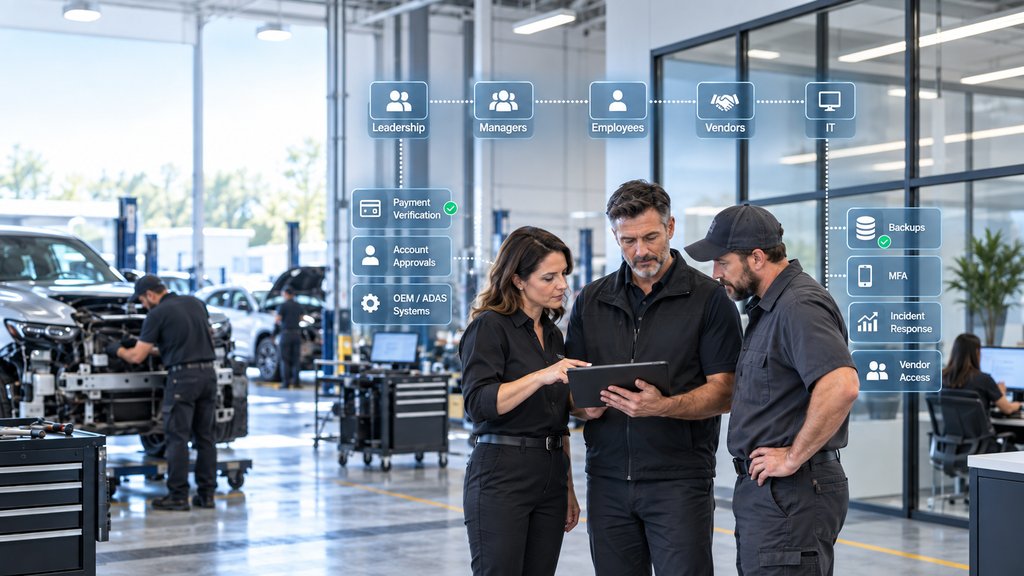
Cybersecurity works only when every role knows what it owns.
IT owns the technical safeguards and the response process. You and your managers own business decisions that technology can't make, employees need a safe way to pause and report, and vendors remain responsible for their platforms. Those lines need to be clear before an urgent request or security incident tests them.
What IT Should Own
IT should protect accounts, devices, networks, backups, and access, then make suspicious activity easy to report and investigate.
That covers updates, MFA, email and endpoint protection, alert monitoring, administrative access, recovery, and the first technical steps when something goes wrong. It doesn't mean your IT provider automatically knows about every application or vendor account someone added outside the normal process.
You should also expect a plain-English explanation of the environment. Which locations and systems are covered? What sits under a software vendor's control? Who sees an alert after hours, and what happens next? A product list isn't an operating process. For a broader view, see what an IT department actually does for a collision center.
What Leadership Should Own
Leadership should define which business actions require verification, approval, and escalation.
Your IT provider can't decide whether a new bank account is legitimate, who may approve a payroll change, or whether a vendor should be allowed to connect remotely. You set those rules, name the people with authority, and give employees permission to stop a request that bypasses the process.
Downtime decisions belong here too. If estimating is unavailable at one location, what comes back first? Who can authorize emergency work? When do you contact the cyber insurance carrier or counsel? IT can explain the technical situation, but leadership decides how the business responds.
What Managers Should Own
Managers turn a written rule into the way the shop actually works.
In practice, this comes down to everyday changes: a new estimator needs access before Monday, a technician moves into a calibration role, or a departing employee still has accounts in systems IT doesn't administer. Your managers know when those changes happen, so they're the ones who have to start the access update.
Managers also teach employees whether it's safe to ask a question. Treat verification as an annoyance and people will learn to move fast and stay quiet. Treat it as part of protecting the shop and reporting becomes normal.
What Technical Operations Should Own
Technical operations should decide who needs ADAS and OEM system access; IT should secure the accounts, devices, and connections.
ADAS work can involve scan tools, calibration software, OEM repair information, subscriptions, specialized workstations, and outside platforms. The manager responsible for repairs and calibrations knows which technicians need each resource, what training or authorization the role requires, and when that access must change.
IT doesn't decide who is qualified to perform a calibration or interpret an OEM procedure. It provides unique accounts where the platform allows them, protects credentials, enables MFA when available, secures the workstation and network connection, documents vendor access, and carries out approved changes. When a technician moves to another role or leaves, technical operations needs to identify the OEM portals, scan-tool subscriptions, and calibration accounts that must be updated or removed.
What Accounting and Administrative Teams Should Own
Financial and administrative teams should verify sensitive changes through a known, separate contact method.
Changed payment instructions, payroll updates, refund requests, unusual purchases, and requests for financial information deserve an independent check. Use a phone number your team already knows, not the number, reply address, or link supplied in the request.
Some actions also need a second approval. No employee should have to make a rushed financial decision alone because a message says the owner is unavailable and the vendor is waiting.
What Estimators and Front-Office Employees Should Own
Employees should know when to pause, what not to approve, and exactly where to report a questionable request.
Estimators and front-office employees work through a constant stream of emails, documents, portals, texts, and calls. A fake shared estimate or insurer notice fits naturally into that day. So does a Microsoft 365 login page that appears just when someone is waiting for a file.
CISA's phishing guidance emphasizes recognizing and reporting suspicious messages. Your employees don't need to investigate the message themselves. They need one clear way to reach the person who will.
What Vendors Should Own
Vendors should protect their platforms and follow your rules for access, while your shop keeps visibility into each connection.
Estimating platforms, phone companies, camera installers, payroll providers, calibration vendors, and other outside companies each control part of the environment. Remote access needs an owner, an approved purpose, a limit, and an end date.
When two vendors point at each other, you shouldn't be stuck refereeing the problem. One accountable technology partner should connect the technical pieces, keep you informed, and make sure each vendor handles its own system.
What Multi-Location Leadership Should Own
Leadership should set one minimum technology and security standard for every location and make every exception visible.
A collision-center group can look consistent to customers while the shops use different Wi-Fi, backup routines, access rules, shared accounts, vendor connections, and escalation procedures. Those differences usually come from acquisitions, emergency fixes, and local purchasing decisions rather than a deliberate plan.
Define which systems require MFA, how role changes reach IT, how recovery gets tested, who approves vendor access, and who leads a problem that crosses locations. IT can document and enforce the technical standard. Your local managers still have to report the employees, applications, ADAS and OEM systems, and odd exceptions that IT can't discover on its own.
For a deeper operational review, see how to standardize technology across multiple collision-center locations.
What Happens at the Handoffs
Most preventable security failures begin at a handoff between two responsible people.
IT disables Microsoft 365, but nobody mentions the estimating account, two OEM portals, or the ADAS calibration platform. Accounting verifies a vendor by replying to the same compromised email thread. A vendor receives permanent remote access for what was supposed to be a one-time project. Everyone completed one part of the job; the handoff still failed.
You don't need another policy binder to fix that. You need a short process for the moments where business decisions and technical work meet.
A Three-Step Responsibility Plan
A usable responsibility plan can fit into three steps.
1. Name the High-Risk Actions
Start with payment and payroll changes, password resets, administrative access, vendor remote access, sensitive information, suspected incidents, and changes to ADAS or OEM system access at any location.
2. Assign the Decision and the Technical Support
For each action, name who verifies it, who approves it, who performs the technical work, which vendor might be involved, and who needs to know the result. Use actual roles instead of writing only 'management' or 'IT.'
3. Test One Scenario
Walk through a fake bank-change request or a technician changing roles while retaining access to several OEM portals. Then try a bigger problem, such as ransomware at one location. The point is to find missing contacts and unclear decisions while the business is calm.
Questions Leadership Should Be Able to Answer
Clear ownership means these questions have specific answers.
- Who verifies changed payment and payroll instructions?
- Who tells IT when an employee changes roles or leaves, including access to estimating, OEM, and ADAS systems?
- Who approves vendor remote access, and when is that access removed?
- Where should an employee report a suspicious message or login prompt?
- Who verifies that every location follows the same minimum standards for access, backups, vendor connections, and incident response?
- Who can make decisions if the owner or general manager is unavailable?
Specific answers reduce hesitation and give IT the authority and information needed to protect the systems you actually use. For a broader provider review, use 10 questions every collision center owner should ask an IT provider.
Give Every Role a Clear Part and One Partner the Complete Picture
Your cybersecurity plan works when each role owns its decisions and one partner can see the complete environment.
Tech Marvel helps growing New Jersey collision centers replace informal IT support with one accountable technology partner for every location. We help you define responsibilities, control access, coordinate vendors, prepare for incidents, and keep the technology around estimating and production working.
If your collision center is in Morris County or elsewhere in Northern New Jersey, the goal is straightforward: fewer missed handoffs, less time chasing vendors, and less technology management sitting on your plate.
Schedule Your Free IT Roadmap Meeting. Walk us through your shops and current technology environment, and Tech Marvel will help identify unclear ownership, recurring problems, and practical next steps.
Not ready for a meeting? Start with 10 Signs You've Outgrown ‘The IT Guy’ to see whether informal support still fits your business.