
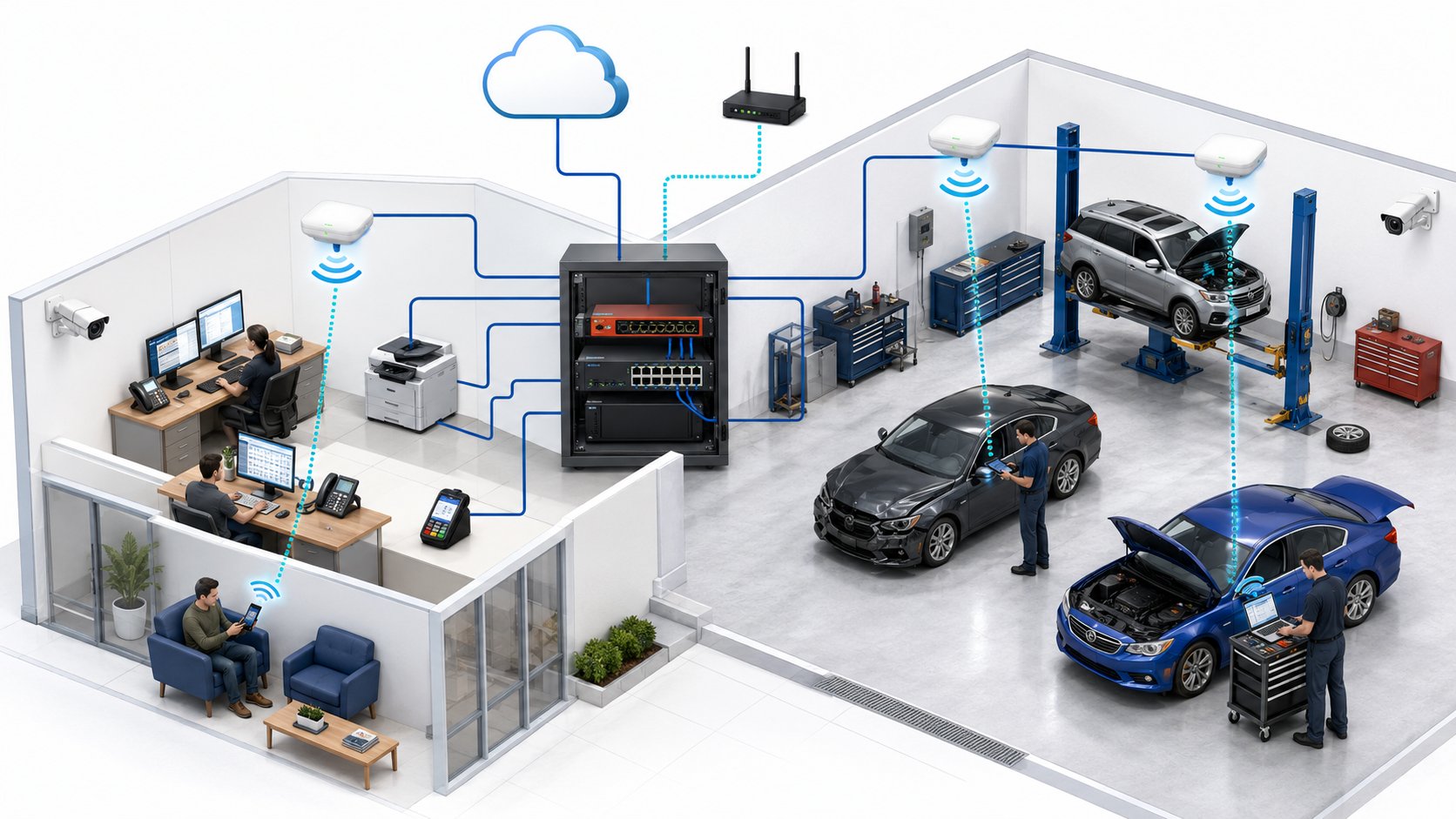
A reliable collision center network depends on five things working together: enough internet capacity, properly designed Wi-Fi, business-grade network equipment, separation between different types of devices, and a backup plan for internet outages. Fast internet alone is not enough.
A collision center can have a very fast internet connection and still struggle with dropped Wi-Fi, slow uploads, unreliable phones, or employees who can't stay connected in parts of the shop. The reason is simple: internet speed, Wi-Fi coverage, and network reliability are three different things.
For collision centers, that distinction matters because estimating, parts ordering, repair procedures, customer communication, phones, cameras, cloud applications, and other daily systems may all depend on the same network.
The goal isn't to build the most complicated network possible. It's to create one that employees rarely have to think about.
| Network Requirement | Why It Matters |
|---|---|
| Enough Internet Capacity | Keeps cloud applications, uploads, phones, and daily business systems responsive |
| Proper Wi-Fi Coverage | Gives employees reliable connectivity throughout the office and shop |
| Business-Grade Network Equipment | Improves reliability, security, and manageability |
| Network Separation | Keeps business systems separate from guests, cameras, and other connected devices |
| Backup Connectivity | Helps critical operations continue if the primary internet connection fails |
1. Start With the Internet Connection
The internet connection is the foundation of most modern collision center technology.
Employees may use it for:
- CCC ONE and other estimating or management systems
- Parts ordering
- Microsoft 365
- Cloud file storage
- Repair information
- Customer communication
- VoIP phone systems
- Software updates
- Remote support
- Online vendor portals
The amount of internet bandwidth a collision center needs depends on how many people are using the connection at the same time and what they're doing with it.
A shop with 15 employees using mostly web-based applications has different requirements than a multi-location organization with dozens of employees, cloud phones, large file transfers, remote access, and other internet-dependent systems.
That's why I would be cautious about anyone who says:
"Every collision center needs exactly ___ Mbps."
Internet requirements aren't determined by employee count alone.
What matters is simultaneous usage.
For example, uploading repair photos, participating in video meetings, using cloud applications, downloading software updates, and making VoIP calls all consume bandwidth differently.
The connection also needs to provide sufficient upload speed, not just download speed.
Most people notice the large download number advertised by an internet provider, but upload capacity can become important when employees are sending photos, synchronizing cloud files, backing up information, or using other cloud-based systems.
What Should You Ask About Your Internet Connection?
Instead of focusing only on the advertised speed, ask:
- Is the connection consistently delivering the service we're paying for?
- Is there enough capacity during the busiest parts of the day?
- Are upload speeds adequate for the applications we use?
- Are internet-related problems actually caused by the provider, or by our internal network?
- What happens to the business if this connection goes down?
That last question becomes increasingly important as more of the business moves to the cloud.
2. Fast Internet Does Not Mean Good Wi-Fi
This is one of the most common misunderstandings we see with business networks.
You can have a very fast internet connection and terrible Wi-Fi.
The internet connection brings service into the building.
Wi-Fi determines how reliably wireless devices connect inside the building.
Those are separate problems.
Collision centers can be particularly challenging environments for wireless networking because the building is not always designed like a typical office.
A shop may have:
- Large open production areas
- Offices separated from the shop floor
- Metal walls or structures
- Equipment that affects wireless signals
- Vehicles constantly moving through the building
- Employees using tablets or mobile devices in different areas
- Cameras and other wireless devices competing for connectivity
Installing one wireless router near the front office and hoping it covers the entire building often leads to problems.
Employees may experience strong Wi-Fi near the office but weak or inconsistent connections toward the back of the shop.
An estimator may walk around a vehicle taking photos and lose connectivity.
A tablet may work reliably in one bay and struggle in another.
Employees may eventually learn which parts of the building have "good Wi-Fi" and which don't.
That shouldn't be normal.
Good Wi-Fi Starts With Coverage
A properly designed wireless network uses multiple access points positioned to provide consistent coverage across the areas where employees actually work.
The goal isn't simply to show full signal bars.
Employees should be able to move through the building without regularly disconnecting, reconnecting, or waiting for applications to respond.
Placement matters.
The number of access points matters.
The building itself matters.
That's why Wi-Fi should be designed around the physical shop rather than based on a generic rule such as "one access point per X employees."
3. Use Business-Grade Network Equipment
A collision center's network is production infrastructure.
That means the equipment supporting it should be designed for a business environment.
The core network may include:
- Firewall
- Network switches
- Wireless access points
- Internet modem or provider equipment
- Cabling
- Battery backup
- Network management tools
Business-grade equipment provides advantages that consumer equipment generally does not.
It can typically be monitored and managed centrally, configured consistently, updated more reliably, and designed with security and redundancy in mind.
That becomes especially important across multiple collision center locations.
If every location buys whichever router or wireless system happens to be available when something fails, the organization eventually ends up with a collection of different environments that are harder to support.
One shop behaves differently from another.
Troubleshooting takes longer.
Security policies are inconsistent.
Replacement equipment is harder to plan.
A standardized network design solves much of that complexity.
When each location follows the same basic network standard, your IT provider already understands how the environment is supposed to work.
That makes support faster and makes adding future locations much easier.
4. Don't Put Everything on the Same Network
A modern collision center can have far more connected devices than employees realize.
Beyond employee computers and phones, the network may also support:
- Security cameras
- Guest Wi-Fi
- Building access systems
- Smart TVs
- Printers
- Scanners
- Phones
- Tablets
- Vendor equipment
- Internet-connected shop devices
Those systems should not necessarily all communicate with each other.
For example, a customer using guest Wi-Fi does not need access to the same network as your accounting computers.
Security cameras do not need unrestricted access to employee systems.
Certain third-party devices may need internet access without needing access to the rest of your business network.
Separating these systems helps improve both security and reliability.
Think of it as creating different lanes on the same road.
The devices may ultimately share the same internet connection, but they do not all need permission to travel everywhere inside your network.
A properly designed network may separate:
- Employee business devices
- Guest Wi-Fi
- Security cameras
- Phones
- Servers or critical systems
- Other connected equipment
The exact design depends on the business.
The important principle is that everything should not automatically live on one large, unrestricted network simply because that is the easiest way to install it.
5. Decide What Happens When the Internet Goes Down
No internet provider can guarantee that a connection will never fail.
Construction can damage a line.
Provider equipment can fail.
A regional outage can occur.
Power problems can affect local infrastructure.
The question for a collision center is not whether an internet outage is possible.
It's how much of the business stops when it happens.
Consider what your employees would lose if the primary internet connection disappeared for several hours.
Could they still:
- Access estimating systems?
- Order parts?
- Use email?
- Make and receive phone calls?
- Communicate with customers?
- Access repair information?
- Process payments?
- Use cloud applications?
The more operations depend on internet connectivity, the stronger the business case becomes for a secondary connection.
Does Every Collision Center Need Backup Internet?
Not necessarily.
A backup internet connection should be based on the operational cost of an outage.
For a small shop that can tolerate a short interruption, the additional monthly expense may not be justified.
For a larger or high-volume location where an outage immediately affects estimating, parts, phones, and customer communication, redundancy may be worth the investment.
Backup connectivity might use:
- A second wired internet provider
- A different carrier or technology where available
- Cellular connectivity
- Another appropriate failover service
The important part is avoiding a false sense of redundancy.
Two internet connections are much less valuable if both depend on the same physical infrastructure and fail together.
Your IT provider should help you understand what level of redundancy is practical at each location.
Why Some Collision Centers Still Have Bad Wi-Fi After Upgrading Their Internet
Consider a collision center that upgrades from an older internet plan to a much faster connection because employees complain that "the internet is slow."
The new connection is installed.
Speed tests near the front office look excellent.
But employees in the shop still complain.
Photos are slow to upload.
Wireless devices disconnect.
Certain bays have unreliable coverage.
The problem was never the internet connection.
The bottleneck was the wireless network inside the building.
This is why troubleshooting should begin by identifying where the problem actually exists.
There are at least three different layers:
Internet Problem
The connection from the provider to the building is slow or unavailable.
Network Problem
The internal wired network, firewall, switching, or configuration is causing issues.
Wi-Fi Problem
Wireless coverage, interference, access-point placement, or configuration is creating unreliable connectivity.
All three may feel the same to an employee:
"The internet is slow."
But they require very different solutions.
Simply purchasing a faster internet plan won't fix a poorly designed wireless network.
What About Security Cameras?
Security cameras deserve special attention because modern camera systems can place significant demands on a network.
The impact depends heavily on how the camera system is designed.
Some systems record locally.
Others upload video to the cloud.
Some continuously transmit large amounts of data, while others use the internet primarily for remote access and alerts.
Before installing or expanding a camera system, determine:
- How much network traffic it generates
- Whether video stays local or goes to the cloud
- How much upload bandwidth it requires
- Whether the cameras should be isolated from business computers
- What happens if the internet connection fails
- Who is responsible for supporting the cameras and network
This is another example of why network planning needs to consider the entire technology environment rather than just computers.
What About VoIP Phones?
Cloud-based phone systems also depend on the network.
A small amount of network instability that employees barely notice while browsing the web may be very noticeable during a phone call.
Calls may experience:
- Delays
- Choppy audio
- Dropped conversations
- One-way audio
That doesn't necessarily mean the phone provider is the problem.
The underlying internet connection, network configuration, or Wi-Fi may be contributing to the issue.
Your IT provider and phone provider should be able to work together to determine where the problem originates rather than forcing your manager to coordinate between them.
How Should Multi-Location Collision Centers Approach Networking?
Multi-location groups should avoid designing every shop independently.
A better approach is to create a standard network model that can be adapted to each building.
That might establish standards for:
- Firewalls
- Network switches
- Wireless equipment
- Security configuration
- Guest networks
- Camera networks
- Internet redundancy
- Monitoring
- Documentation
- Equipment replacement cycles
The physical layout of each location may require different numbers or placement of access points, but the underlying design philosophy should remain consistent.
That creates an environment where employees know what to expect and the IT team already understands how each new location should be configured.
When another collision center is acquired or opened, you're not designing the technology strategy from scratch.
You're applying an existing standard to a new building.
Five Signs Your Network May Need Attention
You don't need to understand networking technology to recognize that something isn't working properly.
Pay attention if:
1. Employees Know the Wi-Fi Dead Zones
If everyone knows which corner of the building has unreliable wireless connectivity, the issue has probably existed too long.
2. Restarting Network Equipment Is Considered Normal
Occasionally rebooting equipment during troubleshooting is one thing.
Regularly restarting the router because "that fixes it" is a sign that the root problem hasn't been addressed.
3. A Faster Internet Plan Didn't Solve the Problem
If performance issues remain after increasing internet speed, the problem may be inside the building rather than with the internet provider.
4. Different Locations Have Completely Different Networks
Supporting multiple unrelated environments creates unnecessary complexity and makes consistent security much harder.
5. Nobody Knows What Happens During an Internet Outage
If phones, estimating, email, and customer communication all depend on one connection, the business should know how it will operate when that connection fails.
What Should Your IT Provider Be Able to Show You?
You shouldn't need to understand how every network component works.
But your IT provider should.
They should be able to explain:
- What internet service each location has
- Whether the connection has enough capacity
- Where wireless access points are located
- Whether Wi-Fi coverage is adequate throughout the shop
- Which devices are separated from the business network
- What equipment is approaching the end of its useful life
- Whether the network is being monitored
- What happens if the primary internet connection fails
- How the network design supports future growth
For multi-location organizations, they should also be able to explain how consistent the environment is across every shop.
If the answer is different at every location, standardization may be one of the highest-value improvements you can make.
Bottom Line
A reliable collision center network is not defined by the speed printed on your internet bill.
It depends on five things working together:
- Enough internet capacity
- Proper Wi-Fi coverage
- Reliable business-grade network equipment
- Separation between different types of devices
- A plan for internet outages
When those pieces are designed properly, employees should rarely have to think about the network.
They should be able to walk through the shop, access the applications they need, upload information, communicate with customers, and keep repairs moving without wondering whether the Wi-Fi will work in the next room.
That's the real measure of a good collision center network.
Not how fast the speed test looks.
How reliably the technology supports the work happening throughout the building.
Tech Marvel provides managed IT services for collision centers across Morris County and Northern New Jersey.
Has your collision center outgrown “the IT guy”? Get the free guide: 10 Signs You’ve Outgrown “The IT Guy” →