Introduction
If your collision center seems to experience the same technology problems over and over, the issue may not be your computers, your internet connection, or even a particular piece of software. More often, recurring technology issues are a sign that your business has outgrown the way its technology is being managed.
As collision centers grow, technology becomes part of nearly every step of the repair process. Estimators rely on CCC ONE or Mitchell, customer service representatives depend on email and phone systems, technicians access repair procedures, managers review reports, and employees across multiple locations need secure access to the same systems. When technology isn't managed proactively, small problems begin affecting daily operations.
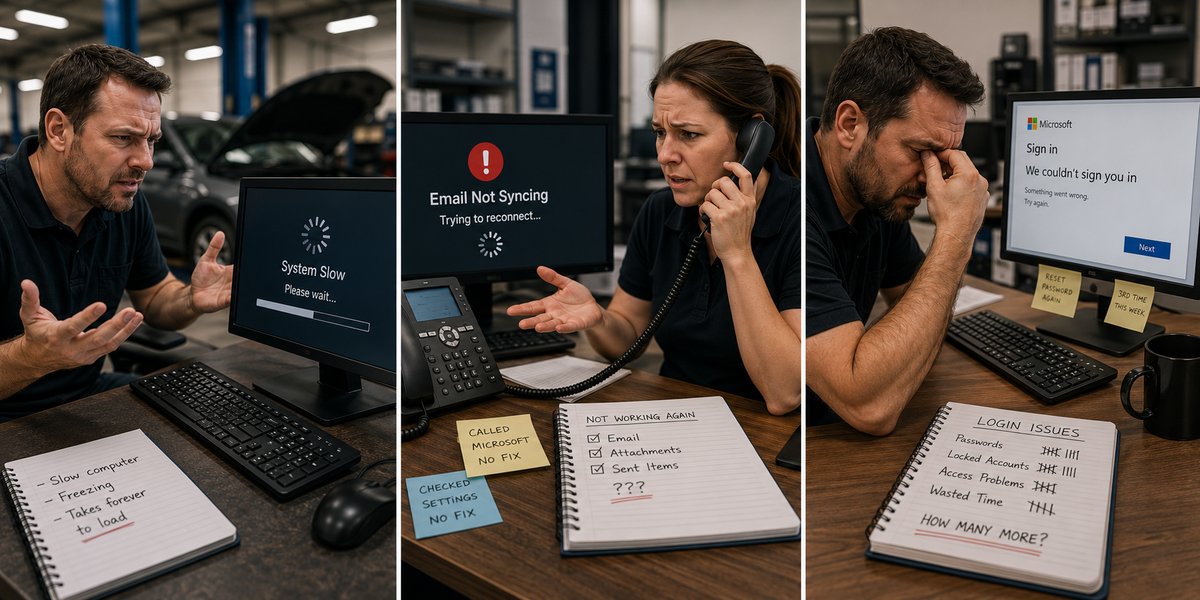
Many business owners assume recurring technology issues are simply part of running a growing company. Slow computers, unreliable Wi-Fi, forgotten passwords, aging servers, and support calls become part of the normal workday. They shouldn't.
The most successful collision centers don't have fewer technology challenges because they're lucky. They have fewer disruptions because they manage technology as a business asset instead of reacting to problems after they occur.
In this guide, we'll look at five signs that your collision center may have outgrown its current approach to IT and what a more proactive technology strategy looks like.
Why Technology Problems Keep Coming Back
Every business experiences occasional technology issues. Hardware eventually fails, internet providers have outages, and software vendors release updates that sometimes create unexpected problems. Those situations are unavoidable.
Recurring technology problems are different.
If your collision center is dealing with the same issues month after month, the problem usually isn't the technology itself. It's that no one is identifying and addressing the underlying cause.
For example, you might have employees who regularly complain about slow Wi-Fi in certain parts of the shop. The issue gets fixed temporarily, only to return a few weeks later. Or perhaps a server runs out of storage every few months, requiring another emergency cleanup. Maybe employees repeatedly experience login problems, printers stop working without explanation, or computers become so slow that restarting them has become part of the daily routine.
These aren't isolated incidents. They're symptoms of a reactive approach to IT.
When technology is managed reactively, the goal is simply to get employees working again as quickly as possible. While that may solve today's problem, it often doesn't prevent the same issue from happening again. Over time, those recurring disruptions become accepted as "just the way things are."
A proactive approach looks very different.
Instead of repeatedly fixing the symptoms, someone investigates why the problem keeps occurring. Is your wireless network designed to provide reliable coverage throughout the entire facility? Is aging hardware slowing employees down? Is a recurring software issue the result of outdated equipment or inconsistent configurations? Are recurring support requests pointing to a larger problem that should be addressed once instead of repaired repeatedly?
Solving the root cause usually requires more effort upfront, but it reduces future downtime, improves employee productivity, and allows your team to spend less time working around technology problems.
Technology should quietly support your business in the background. If your employees are regularly dealing with the same issues, it's worth asking whether the problem is the equipment itself or the way your technology is being managed.
You're the One Coordinating Technology Instead of Running the Business
One of the clearest signs that a collision center has outgrown its current IT support is when the owner, general manager, or office manager becomes the unofficial technology coordinator.
Technology issues rarely involve just one vendor anymore. A single problem might involve your internet provider, your phone system, Microsoft 365, CCC ONE or Mitchell, a firewall, wireless equipment, or a third-party software vendor. When no one is taking ownership of the issue, your team is left trying to determine who is responsible.
It often sounds something like this:
"Our internet provider says the connection is fine."
"The software vendor says it's a network issue."
"The network vendor says it's the firewall."
"The firewall vendor says to call Microsoft."
Meanwhile, your employees are waiting, production has slowed, and someone in your organization is spending valuable time coordinating phone calls instead of focusing on customers and repairs.
For a collision center owner or manager, this hidden cost is easy to overlook. Even if each issue only takes an hour or two to resolve, those interruptions add up over the course of a year. More importantly, they pull leadership away from the work that actually grows the business.
As your collision center grows, technology becomes too interconnected for a collection of independent vendors to manage effectively. Someone needs to understand how all of the systems work together and take ownership of resolving problems, regardless of which vendor ultimately caused them.
That's one of the biggest differences between reactive IT support and proactive IT management.
Instead of telling you who to call next, a proactive technology partner becomes your single point of accountability. They work directly with your internet provider, software vendors, phone company, and other technology partners to diagnose the issue, coordinate the resolution, and keep your team informed throughout the process.
Your managers shouldn't have to become IT project managers every time something goes wrong. Their job is to keep vehicles moving through production, support employees, and deliver an exceptional customer experience. The right technology strategy allows them to stay focused on those priorities while someone else manages the complexity behind the scenes.
Every Location Operates Differently
Adding a second or third collision center is an exciting milestone, but it also introduces a new level of technology complexity. Without a plan to standardize systems, every new location tends to develop its own way of doing things.
One shop might have newer computers while another is still using aging equipment. Wi-Fi equipment may be different at each location. Internet providers vary, printers are purchased as needed, passwords are managed differently, and software settings become inconsistent over time. Even something as simple as naming conventions for computers or user accounts can vary from one location to the next.
These differences may seem minor on their own, but together they create an environment that is harder to support, more expensive to maintain, and more vulnerable to security risks.
For employees who work across multiple locations, inconsistent technology creates unnecessary frustration. Logging into different systems, learning different processes, or dealing with equipment that performs differently from one shop to another slows productivity and increases support requests.
The impact extends beyond day-to-day operations. When every location is unique, troubleshooting becomes more difficult because technicians can't rely on a consistent environment. Hardware replacements take longer, software deployments become more complicated, and new employees require additional training simply because each shop operates differently.
Standardization doesn't mean every location must be identical. Different facilities may have unique equipment or operational requirements. The goal is to create consistency wherever possible so technology is predictable, secure, and easier to support.
A mature technology strategy establishes standards for the systems that every location depends on, including computers, networking equipment, Wi-Fi, Microsoft 365, cybersecurity policies, user access, backup procedures, and lifecycle planning. When those core technologies are consistent across the organization, supporting multiple locations becomes significantly easier.
As your collision center grows, technology should become more organized, not more fragmented. If every location feels like it has its own IT environment, it's often a sign that your business has outgrown an ad hoc approach to technology management.
Technology Decisions Only Happen During Emergencies
Many collision centers don't intentionally avoid planning their technology. They're simply too busy running the business.
When production is steady, customers are happy, and vehicles are moving through the shop, technology often fades into the background. It only gets attention when something stops working.
A server fails, so it's replaced.
A firewall reaches the end of its life after it causes problems.
An employee's computer becomes unusably slow, so a new one is ordered.
Internet service becomes unreliable, so someone starts calling providers.
Each decision solves an immediate problem, but it doesn't create a long-term strategy.
Over time, this reactive approach leads to a patchwork technology environment where equipment is purchased at different times, systems are upgraded inconsistently, and budgets are driven by emergencies instead of planning. One year there may be almost no technology expenses. The next year, multiple servers, networking equipment, and employee computers all need to be replaced at once.
That unpredictability makes budgeting difficult and increases the likelihood of unexpected downtime.
A proactive technology strategy takes a different approach.
Instead of waiting for equipment to fail, technology is reviewed regularly. Hardware is replaced according to a planned lifecycle, software is kept current, security risks are addressed before they become incidents, and future business needs are considered when making purchasing decisions.
For example, if you know several computers are approaching the end of their useful life over the next 12 months, you can replace them in phases rather than all at once after multiple failures. If you're considering opening another location, upgrading your network infrastructure before expansion is far less disruptive than rebuilding it afterward.
Planning also helps ensure technology investments support your business goals. Rather than asking, "What broke this month?" the conversation becomes, "What technology will help us operate more efficiently over the next three to five years?"
Collision centers that manage technology proactively experience fewer surprises because they aren't making critical decisions under the pressure of an outage or equipment failure. Instead, they follow a roadmap that aligns technology investments with the growth of the business.
You're Never Quite Sure Whether Your Business Is Actually Protected
Ask most collision center owners if their business is secure, and the answer is often something like, "I think so."
They have antivirus software. Employees log in with passwords. Files are backed up. Microsoft 365 is in place. On the surface, everything appears to be covered.
The problem is that confidence isn't the same as certainty.
As technology becomes more important to daily operations, business owners need clear answers to important questions, not assumptions.
For example:
- Are your backups completing successfully every day?
- Has anyone actually tested that they can be restored?
- Do former employees still have access to company systems?
- Is multi-factor authentication enabled for every user?
- Who has administrative access to your Microsoft 365 environment?
- Are your computers and servers receiving security updates?
- If ransomware struck tomorrow, how quickly could you resume operations?
If those questions are difficult to answer, it doesn't necessarily mean your collision center is at risk. It often means no one is consistently responsible for reviewing and managing these areas.
That's a common challenge for growing businesses.
Security isn't a one-time project that gets completed when new software is installed. Employees join and leave the company. New devices are added to the network. Software changes. Cyber threats evolve. Without ongoing oversight, even well-designed systems gradually become less secure over time.
The same applies to backups and disaster recovery. Having backup software installed isn't enough if no one is monitoring failures, testing restorations, or confirming that critical business data can actually be recovered. Many organizations don't discover a backup problem until they need to restore data during an emergency, when it's already too late.
A mature approach to IT management replaces uncertainty with accountability. Instead of wondering whether systems are secure or backups are working, someone is actively monitoring, reviewing, testing, and documenting these critical processes. Business leaders gain confidence because they know the answers, not because they hope everything is working as expected.
Technology should give you peace of mind, not unanswered questions.
What Mature IT Management Looks Like
If you recognized several of these signs, it doesn't necessarily mean your current IT provider is doing a poor job. It may simply mean your collision center has reached a point where occasional technical support is no longer enough.
As businesses grow, their technology needs become more complex. Multiple locations, cloud applications, cybersecurity requirements, compliance concerns, and increasing reliance on digital workflows require a more proactive approach to managing technology.
That's where mature IT management differs from traditional break-fix support.
With reactive IT support, the relationship begins when something goes wrong. An employee calls for help, a technician resolves the immediate issue, and everyone moves on until the next problem occurs.
Mature IT management focuses on preventing those problems from happening in the first place.
Instead of waiting for hardware to fail, equipment is replaced according to a planned lifecycle. Instead of discovering backup failures during an emergency, backups are monitored and tested regularly. Instead of leaving managers to coordinate multiple vendors, one technology partner takes ownership of the entire environment and works directly with software providers, internet companies, and other vendors to resolve issues.
More importantly, technology decisions become aligned with your business goals.
For example, if you're planning to hire additional employees, open another location, or acquire another collision center, your technology strategy should support those plans well before they happen. Budgeting, infrastructure upgrades, security improvements, and standardization can all be planned in advance instead of becoming last-minute projects.
A mature technology environment is typically characterized by:
- Standardized systems across every location
- Proactive monitoring that identifies issues before they disrupt operations
- Regular cybersecurity reviews and employee access management
- Verified backup and disaster recovery procedures
- Documented technology standards and processes
- A hardware replacement roadmap instead of emergency purchases
- Strategic planning that aligns technology investments with business growth
- A single point of accountability for managing vendors and resolving issues
When these practices are in place, technology becomes more predictable. Employees spend less time dealing with recurring problems, managers spend less time coordinating vendors, and leadership gains greater confidence that the business is prepared for growth.
Technology may never be completely invisible, but it shouldn't be a daily distraction. The goal isn't simply to fix problems faster. It's to build an environment where fewer problems occur in the first place.
Conclusion
Every collision center experiences technology issues from time to time. The difference is whether those issues are isolated events or recurring obstacles that disrupt your business.
If you're constantly dealing with the same problems, coordinating multiple vendors, making technology decisions during emergencies, or wondering whether your systems are truly protected, those aren't just IT frustrations. They're often signs that your business has outgrown a reactive approach to technology management.
As your collision center grows, technology becomes increasingly important to productivity, customer service, security, and long-term profitability. Investing in proactive IT management helps create a more stable, secure, and scalable operation, allowing your team to focus on repairing vehicles instead of troubleshooting technology.
At Tech Marvel, we help collision centers build technology strategies that support growth, reduce downtime, and simplify IT management across one or multiple locations. Whether you're evaluating your current environment or planning for future expansion, taking a proactive approach today can help prevent costly disruptions tomorrow.
Call 862-201-5710 or schedule your Free 20-Minute Dealership IT Review.