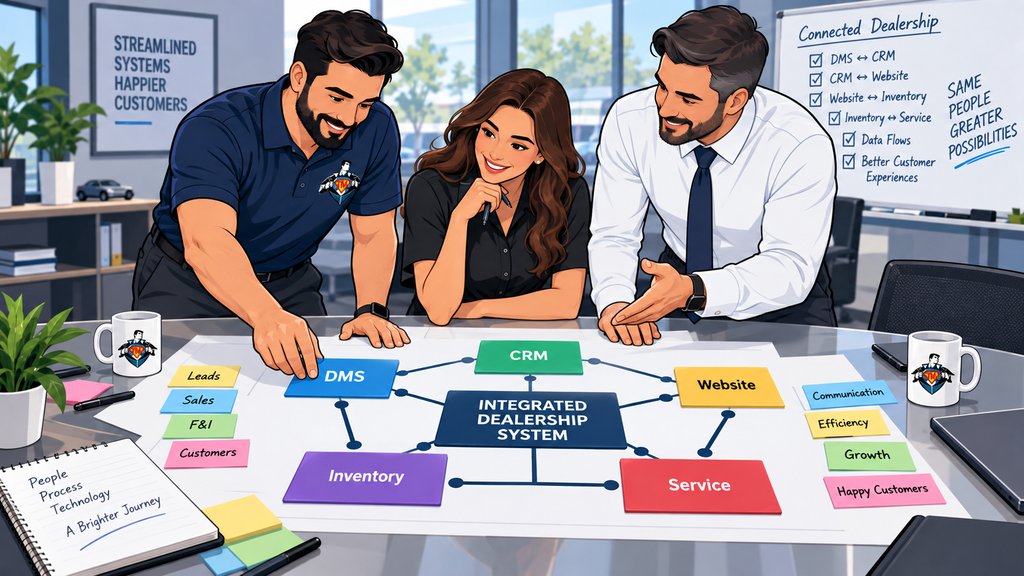
A customer submits a lead online. It reaches the CRM, but the salesperson still has to type part of it somewhere else. A vehicle changes status, yet the website or marketplace feed doesn't update when expected. By the time service, accounting, phones, texting, email, and reporting touch the same customer, you can have several versions of the record.
You look at that mess and wonder why the dealership owns so many systems that don't work together. Usually, nobody designed it that way on purpose. The stack grew one useful purchase at a time. Each product solved a real problem, but nobody took responsibility for every handoff around it.
Dealership systems often do not work together because they come from different vendors, were added at different times, organize data differently, and offer different integration methods. The practical goal is to define which system owns each type of information, reduce unnecessary duplicate work, secure the connections, and give one person responsibility for coordinating the gaps.
How a dealership technology stack becomes fragmented
A dealership technology stack becomes fragmented when useful products are added one at a time without one owner for the data, access, and workflow between them.
The dealer management system may sit at the center of the business, but it does not perform every sales, service, inventory, communications, finance, accounting, analytics, and customer-experience function equally well. Departments add specialized products because those products help them do their jobs. Over time, the dealership can end up with a strong collection of individual tools and a weak process between them.
Ownership changes make the gaps easier to see. A new platform can bring different logins, data fields, exports, and vendor responsibilities. An acquisition may add another DMS, CRM, phone system, Microsoft 365 environment, and a few local workarounds that only one employee understands. Tech Marvel's multi-location dealership IT standards article explains why those informal fixes become harder to manage across several rooftops.
What integration actually means
An integration must define what data moves, which direction it moves, how quickly it moves, and which vendor responds when it fails.
Red Hat's API overview describes APIs as definitions and protocols that let software products communicate, which is why the word integration alone does not explain how data moves or who supports the connection.
Vendors use the word integration pretty loosely. It might mean a real-time application programming interface, or API. It could also be a scheduled export, one-way feed, single sign-on connection, or an employee copying information between two screens. Those aren't the same thing.
A useful integration should answer four questions: what information moves, which direction it moves, how quickly it moves, and what happens when it fails. It should also be clear which vendor supports each side of the connection. A green status in one product does not prove that the receiving system accepted or interpreted the data correctly.
Where disconnected systems create the most work
Disconnected systems create the most work where customer, vehicle, service, finance, accounting, and employee information crosses departmental boundaries.
Leads and customer records
Website forms, the CRM, DMS, call tracking, texting, email, and marketing platforms may all collect customer information. Small differences in names, phone numbers, email addresses, consent fields, or customer identifiers can create duplicates and incomplete histories. Employees then spend time figuring out which record is current.
Inventory and listing feeds
Vehicle status, pricing, photos, descriptions, and availability may move through several systems before appearing on the dealership website and third-party marketplaces. A delay or mapping error can make the technology look broken even when each vendor insists its own system is functioning.
Service and parts workflows
Online scheduling, repair orders, technician workflows, customer messaging, payments, parts information, and manufacturer systems do not always share data in the same way. When employees create manual workarounds, those workarounds can become permanent without anyone documenting why they exist.
Finance and accounting
Lender portals, e-contracting, identity verification, document systems, the DMS, payroll, banking, and accounting processes have different security and data requirements. Convenience matters, but so do permissions, audit trails, and knowing where sensitive information is stored.
Employee access
Separate systems usually mean separate user accounts. Without a consistent dealership employee onboarding and offboarding process, a new employee can wait for access while a former employee keeps an account everyone forgot. Single sign-on helps where vendors support it, but it doesn't replace a complete system list and a named owner for each account.
Do not buy another platform until you map the workflow
Map one important dealership workflow before buying another platform so you can separate product limitations from process and ownership problems.
When the stack feels disorganized, the instinct is to look for one more product that promises a single view. Sometimes a consolidated platform is the right decision. Before buying it, map the process that is causing the frustration.
- Choose one workflow, such as a web lead becoming a completed deal or an online appointment becoming a closed repair order.
- List every system, vendor, employee role, data entry point, export, notification, and manual step involved.
- Identify the system of record for customer, vehicle, deal, service, employee, and accounting information.
- Mark where information is retyped, delayed, changed, or lost.
- Ask each vendor what supported API, data feed, export, single sign-on, and audit capability is available.
- Pilot the change with a measurable workflow before trying to replace the whole technology stack.
This exercise often shows that the dealership has two different problems. One is a product or integration limitation. The other is unclear ownership of configuration, data quality, user access, or vendor follow-up. A new product may address the first problem and leave the second one untouched.
The right questions to ask a dealership technology vendor
Which system is the source of truth, what information moves, who owns the connection, and what happens when a transaction fails?
- Which system remains the source of truth after the integration?
- Is the connection real-time, scheduled, one-way, or two-way?
- Who owns the interface and who supports it when data stops moving?
- Can the dealership export its information in a usable format?
- How are duplicate records, field conflicts, and failed transactions handled?
- Does the integration support single sign-on and role-based access?
- What third parties receive dealership or customer data?
- How will the change affect reporting, offboarding, backups, and cyber insurance documentation?
- What will employees still have to do manually?
What your IT provider should own
Your IT provider should own the surrounding network, identity, devices, security, documentation, and coordination without pretending to replace proprietary software vendors.
Your IT provider shouldn't pretend to be the DMS, CRM, lender, OEM, or service-software developer. Those vendors support their proprietary applications. A managed IT services and vendor coordination partner should own the surrounding environment: internet and Wi-Fi, workstations, identity and email, secure vendor access, network segmentation, documentation, monitoring, and coordination when a failure crosses systems.
That coordination matters because you shouldn't have to translate technical messages among five vendors. If you've dealt with auto dealership IT vendors blaming each other, you know how quickly the dealership becomes the unpaid project manager. One accountable technology partner can collect evidence, keep the vendors talking, and separate a network problem from an application or workflow problem.
A better stack is easier to understand and manage
A better dealership technology stack reduces duplicate work, protects access, makes handoffs visible, and assigns responsibility when data stops moving.
The goal is not necessarily to reduce the dealership to one giant application. Specialized systems can be valuable. The goal is to remove unnecessary duplicate work, make the important handoffs reliable, protect access, and know who owns the outcome when data or workflows stop moving.
Tech Marvel combines dealership IT experience with over 30 years of technology expertise to help New Jersey dealerships reduce downtime, strengthen cybersecurity, coordinate technology vendors, and get clear answers from one accountable local partner. Learn more about Tech Marvel's IT support for auto dealerships in New Jersey.
Schedule Your Free 20-Minute Dealership IT Review
Schedule Your Free 20-Minute Dealership IT Review if one workflow requires too many logins, spreadsheets, retyped fields, and vendor calls. You should not have to become the unpaid project manager for systems you already pay vendors to support. The better outcome is a stack your team can use and leadership can understand, with one accountable partner coordinating the gaps.
The process is simple: Schedule Your Dealership IT Review. Review Your Systems, Vendors, and Risks. Then Get One Local IT Partner Who Owns the Outcome.
Not ready to schedule a review? Get the Plain-English Guide to the IT Questions Every Dealership Should Ask Before Switching Providers.