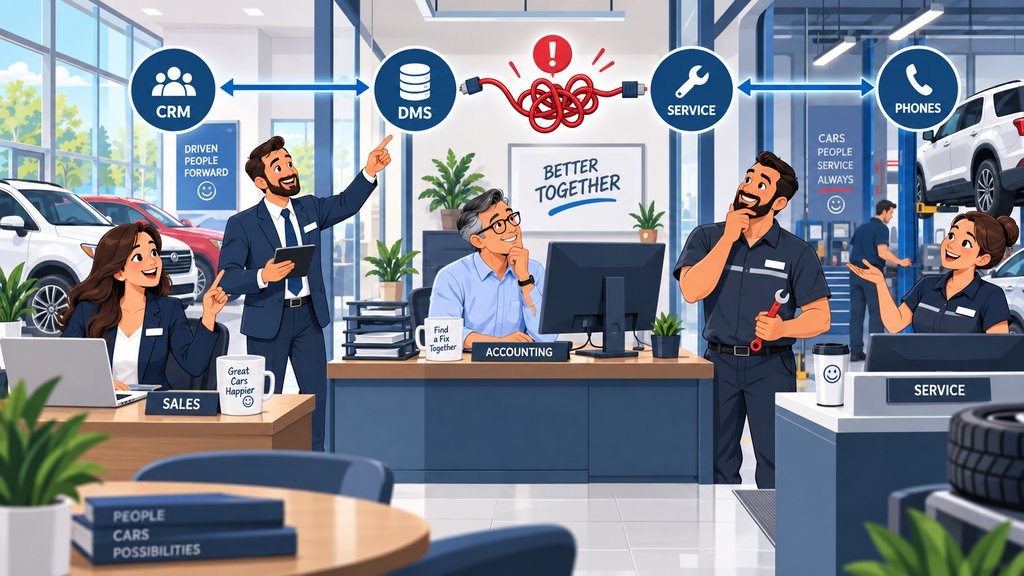
A customer enters information in one dealership system, but it never shows up where someone else expects it.
The CRM is running. The dealer management system (DMS) is running. The internet is working. Nobody sees an obvious outage. Yet sales, service, accounting, or another department is waiting for information that never arrived.
Then the calls start.
One vendor says its system sent the data. Another says its system never received it. Someone checks the network and says everything looks fine. An employee manually enters the information so the dealership can keep moving.
The immediate problem is solved, sort of.
But nobody has answered the more useful question: Where did the workflow actually break?
When dealership systems stop sharing information correctly, troubleshooting should follow the entire data path from the system where the information starts to the system where it is supposed to arrive. The problem may be inside either application, but it may also involve an API, data feed, account permission, integration service, network connection, configuration change, or another system sitting between them.
That distinction matters. If everyone checks only the piece they support, each vendor can technically be correct while the dealership still has a problem.
Dealership Technology Is a Series of Connected Workflows
A dealership does not operate as a collection of completely independent applications. Information often moves between the DMS, CRM, OEM systems, service applications, communications platforms, websites, finance tools, and other vendors.
That movement is easy to forget because employees usually don't see it happening.
A salesperson enters information in one place and expects it somewhere else. Inventory information gets updated and appears on another platform. Customer information moves between systems. Service activity may feed another workflow. A third-party application may retrieve data from the DMS and then send something back.
Current automotive platforms illustrate how interconnected this environment has become. CDK, for example, provides APIs designed to exchange dealership information and connect systems and workflows. CDK Global API Solutions Fortellis provides an automotive platform where dealers, manufacturers, developers, lenders, and data providers can connect applications and business workflows through APIs. Fortellis Platform
CDK also noted in January 2026 that dealership customer information can be spread across CRM, DMS, service, parts, and third-party systems. CDK's 2026 Customer Data Platform announcement
That is why I would not automatically call every integration problem a "DMS problem" or a "CRM problem."
Sometimes both systems are doing exactly what they are supposed to do individually.
The connection between them is what isn't working.
Use a Simple Three-Step Troubleshooting Process
When two dealership systems stop working together, start by mapping the workflow, find the last point where the information was correct, and then document what failed and who owns that part of the process.
You don't need to understand the code behind every integration to troubleshoot it logically.
The basic process is:
- Map the workflow. Identify where the information starts, where it is supposed to go, and what systems or services sit between those two points.
- Find the last known-good handoff. Confirm each step in order until you find the first place where the expected information or action is missing.
- Fix and document the cause. Resolve the failed component, then record what happened, who owns it, and anything that will make the next problem easier to diagnose.
That gives everyone involved the same problem to solve instead of four vendors independently checking their own systems and reporting that everything looks fine.
Start With the Business Workflow, Not the Software
Before troubleshooting an integration, define what the employee was trying to accomplish and what was supposed to happen next.
This sounds obvious, but it is where troubleshooting can go sideways.
Someone reports that "the CRM isn't syncing." That description may be accurate, but it doesn't tell me enough to start changing things.
I'd want to know what the employee actually did.
Did a lead enter one system but fail to appear in another? Did customer information update in the DMS but remain unchanged elsewhere? Did a service appointment fail to move? Is inventory data stale? Did something that normally happens automatically suddenly require manual entry?
The useful starting point is:
What information started where, where was it supposed to go, and what should have happened when it arrived?
Once you can answer that, you can draw a very simple map:
Source system → connection or integration → destination system → next business step
That little map is often more useful than a long list of vendor names.
It changes the conversation from "whose system is broken?" to "where along this path did the expected result stop happening?"
Find the Last Point Where the Data Was Correct
The fastest way to narrow an integration problem is often to identify the last place where the information can be confirmed as correct.
Suppose information begins in System A and should eventually appear in System C.
System A says it created the record correctly.
Fine. Confirm that.
Then determine whether the integration actually picked it up. If it did, determine whether it transferred successfully. If System B processes or translates the information, check what happened there. Then confirm whether System C received it and what System C did with it.
You are narrowing the search instead of guessing.
I use the same basic logic with a lot of technology problems. If something travels through five steps, don't randomly change all five steps. Figure out where it worked last and where it stopped working next.
Otherwise, you can spend a surprising amount of time fixing things that were never broken.
This is also where an IT provider can add value even when it does not own the proprietary dealership software itself. Tech Marvel's role with DMS, CRM, OEM, lender, service, and other dealership platforms is to support the surrounding IT environment and help coordinate the appropriate vendors when those systems overlap with IT.
We don't need to pretend we wrote the DMS to help map how the parts fit together.
Look at What Changed
When an integration that previously worked suddenly fails, one of the first questions should be what changed around the time the problem began.
Sometimes the answer is obvious.
A vendor performed an update. A password changed. Someone replaced equipment. A new application was installed. Permissions were modified.
Other times it takes some digging.
A service account may have expired. An API credential may no longer authenticate correctly. A vendor may have changed a setting. An integration may be expecting a field in one format and receiving something different. A scheduled export or import may no longer be running. A firewall rule or network path may have changed.
The exact possibilities depend on how that particular integration was designed, which is why I wouldn't start changing settings based on a generic checklist.
I would start with the timeline.
When did it last work correctly? What changed between then and now?
That simple question has solved an awful lot of technology problems over the years.
We've dealt with line-of-business applications where repeatedly addressing the individual tickets wasn't enough. The better answer came from understanding how the application behaved, how it interacted with the surrounding environment, and why the same issue kept resurfacing. Once you understand that, you have a much better chance of fixing the underlying problem rather than creating another band-aid.
Document the Handoffs Before Something Breaks
Dealerships should document important system-to-system dependencies while everything is working, not try to reconstruct them during an outage.
You do not need a 200-page technical manual.
You do need enough information for someone to understand the important workflow.
For each important integration, I would want to know:
- Which system owns or creates the original information
- Which system receives it
- Whether another vendor, application, API, data feed, or integration platform sits between them
- Which company supports each component
- What credentials or service accounts are involved, where appropriate
- What the dealership should expect when the integration is working correctly
- Who should be contacted when that workflow fails
- Whether there is a temporary manual process that keeps employees working while the problem is being resolved
That documentation becomes especially valuable when the person who originally set everything up is unavailable or when a dealership changes vendors.
NADA Vault is another useful example of how much data can move between dealership systems and outside companies. NADA describes the platform as helping dealerships manage and syndicate data among vendors, customers, and manufacturers while giving dealers greater visibility and control over those connections. NADA Vault
You may never need a detailed diagram for every minor application.
But if a failed connection can stop employees from selling cars, processing deals, servicing customers, completing accounting work, or communicating with customers, I'd want somebody to understand that dependency before it becomes an emergency.
For dealer groups, this becomes even more important. Our article on IT standards for multi-location auto dealerships looks at the broader need for consistent documentation and technology standards across rooftops.
Do Not Confuse an Integration Failure With an Internet Failure
An integration problem and a connectivity problem can produce similar symptoms, but they require very different fixes.
If employees cannot reach anything, you may have a broader network or internet issue.
If almost everything works except one workflow between two applications, I would be much more cautious about blaming the internet.
That doesn't mean the network is automatically innocent. Some integrations depend on local equipment, firewall rules, VPNs, DNS, specific ports, or other infrastructure.
But the symptom matters.
If employees can use System A and System B separately but System A's information no longer reaches System B, replacing the Wi-Fi access point probably isn't where I'd start.
Again, map the path.
The network may be one step on that path. If it is, test it.
If it isn't, keep moving.
This is one of the reasons a dealership benefits from an IT partner that understands the surrounding environment rather than looking only at individual computers. The goal is to determine which part actually failed before people start making changes.
Make One Person Own the Troubleshooting Process
Several companies may need to participate in an integration problem, but someone still needs to coordinate the troubleshooting from beginning to end.
This is where the new article connects to, but does not duplicate, our discussion of what happens when dealership technology vendors blame each other.
That article is about accountability.
This issue is more specific.
Once you know the workflow, somebody needs to walk through it methodically.
The CRM vendor may need to confirm what it sent. The DMS company may need to verify what it received. The IT provider may need to check network connectivity, DNS, firewall rules, local services, or other infrastructure. A third-party integration vendor may control the piece in the middle.
All of them may need to participate.
Your dealership shouldn't have to referee its technology vendors.
A good technology partner should help establish the facts, bring in the right vendor when necessary, keep everyone working from the same information, and stay with the problem until there is a clear answer.
Fix the Workflow, Then Document What You Learned
Resolving the immediate problem is only half the job. The dealership should also document the cause, the fix, and anything that will make the next incident easier to diagnose.
If a credential expired, document which integration uses it and who owns renewal.
If an update changed a configuration, record what changed.
If a vendor needs to be involved every time a particular feed fails, document the escalation path.
If employees used a manual workaround, decide whether that should become part of the dealership's continuity plan.
And if the same failure has happened three times, stop treating each occurrence as a separate ticket.
At that point, I'd want to understand why it keeps happening.
Recurring problems are usually telling you something.
This is one reason an IT risk assessment for an auto dealership can be useful beyond cybersecurity. A good review should help identify important dependencies, weak documentation, unclear ownership, and other areas where the dealership is relying on something nobody has really mapped.
What a Better Dealership Integration Process Looks Like
A well-managed dealership should know which workflows depend on multiple systems, how those systems exchange information, and who will coordinate troubleshooting when the handoff fails.
You don't need the Controller to understand APIs.
You don't need the General Manager learning database fields.
And you certainly don't need the Dealer Principal sitting in a conference call while three vendors debate whose log file everyone should be looking at.
Leadership needs a simpler level of visibility.
Which systems are important to the business? Which other systems do they depend on? Where does important information move? Who owns each component? Who owns getting the entire workflow working again?
That is enough to turn an ugly troubleshooting session into a much more organized process.
And over time, it helps move the dealership from:
"Something broke. Start calling people."
to:
"We know the workflow. Let's find where it stopped."
That is a much better place to operate from.
Your Dealership Should Not Have to Reverse-Engineer Its Own Systems During an Outage
The best time to understand how dealership systems fit together is before employees are waiting for them to work.
A successful dealership can accumulate a lot of technology over time. The DMS, CRM, service platforms, phones, OEM systems, accounting applications, websites, communications tools, and other vendors may all work well individually while still depending on connections nobody sees during a normal workday.
That is not necessarily evidence that anything was set up badly.
It is often just what happens as a dealership grows and technology gets added one decision at a time.
The question is whether somebody is maintaining the bigger picture.
Tech Marvel combines dealership IT experience with over 30 years of technology expertise to help New Jersey dealerships reduce downtime, strengthen cybersecurity, coordinate technology vendors, and get clear answers from one accountable local partner.
Our managed IT services for New Jersey auto dealerships are built around understanding how the technology your dealership depends on fits together, not simply closing individual tickets.
Schedule Your Free 20-Minute Dealership IT Review
If your dealership has workflows that repeatedly stop working, systems that don't always exchange information correctly, or technology problems that bounce between vendors, we can start by mapping what is actually happening.
Schedule Your Free 20-Minute Dealership IT Review and we can talk through your systems, vendors, recurring issues, and where ownership may be unclear.
Not ready for a conversation yet? Get the Plain-English Guide to the IT Questions Every Dealership Should Ask Before Switching Providers.
Frequently Asked Questions
Integration problems become easier to diagnose when the dealership separates application availability from the workflow that moves information between applications.
If both our DMS and CRM are working, how can the integration still be broken?
Both applications can be available to employees while the process that exchanges information between them has failed. Depending on the setup, the problem could involve an API, data feed, credential, service, permissions, configuration, network dependency, or another vendor in between.
Is a DMS and CRM integration problem normally the IT company's responsibility?
It depends on where the problem is occurring. The DMS vendor may control one component, the CRM vendor another, and the IT provider may control network or infrastructure dependencies. The important part is having someone coordinate the investigation across the complete workflow instead of stopping when their individual piece appears healthy.
What should a dealership document about its software integrations?
At minimum, document where important information starts, where it is supposed to go, which systems or services sit between those points, which vendors support them, what normal operation looks like, and who should be contacted when the workflow fails.
Should dealerships map every software connection they have?
Probably not with the same level of detail. Start with workflows whose failure would meaningfully interrupt sales, service, finance, accounting, customer communication, vehicle delivery, or management. Those are the dependencies worth understanding first.