By Ron Conti, Owner and Founder of Tech Marvel
Open the average medicine cabinet and you'll probably find several things purchased for a specific problem: pain reliever, bandages, cough medicine, an old prescription, and something nobody remembers buying. Each item may be useful. The collection still isn't an immune system.
Cybersecurity can build up the same way. You add endpoint protection after one concern, MFA after another, a backup product for an insurance requirement, email filtering after a phishing scare, and remote-access software because a vendor needs to get into one machine. Every purchase can make sense on its own, yet nobody has confirmed that the pieces cover the whole shop or work together when something goes wrong.
A healthy cybersecurity program is measured by coverage, visibility, response, and recovery.
That sounds like a technical distinction, but the questions behind it are practical: What keeps your estimators working? Which systems support scanning and calibration? Who sees an alert at 8:30 on a Friday night? And how does the shop keep moving if one of those systems is unavailable?
A Medicine Cabinet Holds Products. An Immune System Coordinates a Response.
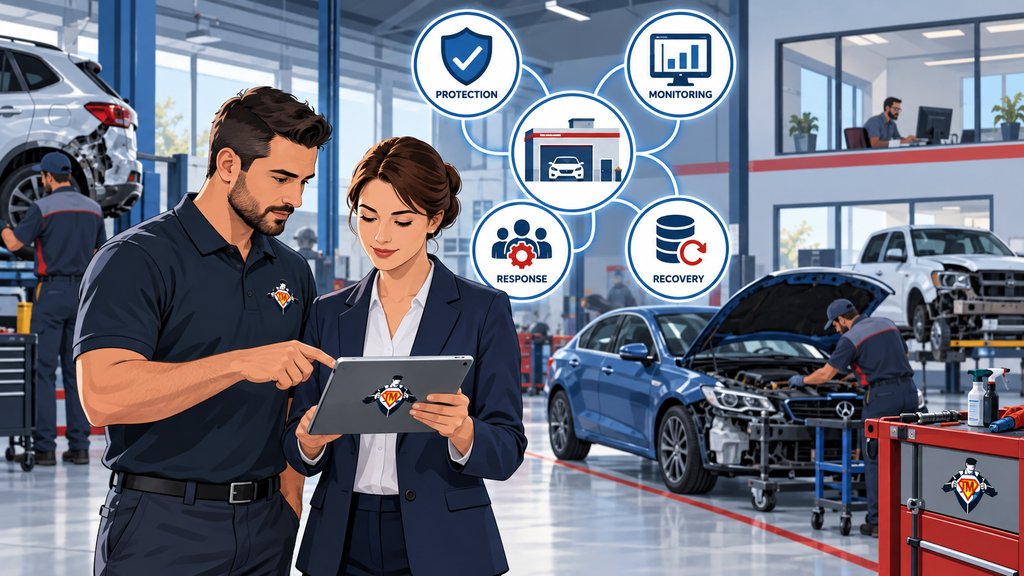
A cybersecurity system connects protection, monitoring, response, and recovery around the work the shop depends on.
A product can block malware, filter an email, require a second login factor, or preserve a copy of your data. It can't decide which workflows matter most, whether every location is covered, who investigates an alert, or how employees work while a critical platform is down.
As your business grows, that distinction matters more. A second location inherits a different firewall. An acquired shop keeps its old accounts. A temporary vendor login stays active because everyone assumes someone else is tracking it. The products are still running, but the environment around them has changed.
Start With What Your Shops Need to Keep Moving
Start with the workflows your shop must keep running.
List what you can't afford to lose: estimating, insurer communication, supplements, parts ordering, customer updates, phones, email, payroll, accounting, cameras, vehicle scanning, ADAS calibration, OEM repair information, access between locations, and the handful of specialized tools that were added for one technician or one vendor. Then map the accounts, devices, networks, cloud services, and outside companies supporting that work.
This is usually where the picture gets interesting. You can see whether a security product solves a business problem, and you often find a system that everyone assumed someone else was protecting.
Know What Each Layer Protects
Which workflows, accounts, and devices does each security control actually cover?
If you use MFA, does it protect only email, or does it also cover estimating, OEM portals, and the ADAS calibration platform? Are scan-tool laptops and calibration workstations included in endpoint protection? What about shared mailboxes and employees checking email from their phones? Your backup inventory also needs to separate information you can restore from platforms that remain under an outside vendor's control.
In February 2024, NIST released version 2.0 of its Cybersecurity Framework and added Govern as a sixth core function alongside Identify, Protect, Detect, Respond, and Recover. That addition fits this problem well: coverage remains incomplete until you set priorities, assign responsibility, and review changes. You can use the framework to organize those decisions without building a compliance department.
Make Coverage Consistent Across Locations
Two locations can use different equipment and still meet the same security standard.
Your newest shop may have current network equipment and individual employee accounts. Another location may still rely on shared credentials, a locally managed calibration workstation, an old Wi-Fi design, or a vendor connection nobody reviewed after the acquisition. From the owner's office, the group can look standardized even while MFA, endpoint protection, backups, monitoring, and recovery vary widely by address.
The goal isn't to force identical hardware into every building. Define the outcome each location must meet, then compare the shops with one location-by-location coverage map. It should show protected systems, monitored alerts, ADAS and OEM resources controlled by vendors, recoverable data, known exceptions, and the person responsible for correcting each exception.
That single view also makes expansion easier. When you buy another shop or open a new location, you have a standard to work toward instead of rebuilding the security plan from memory.
For a deeper operational review, see how to standardize technology across multiple collision-center locations.
Make Sure Alerts Reach a Person Who Can Act
An alert creates value only when someone reviews it and acts.
You should know where alerts go, who decides whether they matter, and what happens after hours. Those basics are among the things every collision center should expect from a managed IT provider. When several companies are involved, one accountable technology partner should connect the signals and manage the response so you aren't calling the email provider, the estimating vendor, the calibration vendor, and the internet company one by one.
Plan for a Layer to Fail
Assume that one protective layer will eventually fail.
Email filtering reduces bad messages, but an employee still needs a way to verify the convincing one that gets through. MFA makes a stolen password less useful; it doesn't help if someone approves an unexpected prompt. Endpoint protection covers estimating and calibration workstations, while monitoring and tested backups address different parts of the same incident.
That overlap is resilience when every layer has a clear job. Two products doing the same thing, sending alerts to different dashboards that nobody owns, are simply extra cost and extra noise.
Recovery Is Part of the Security System
Recovery determines whether your collision center can resume work after protection fails.
Backups often get discussed separately from cybersecurity, even though recovery is where security meets the workday. You need to know what can be restored, when it was last tested, who starts the process, and which functions come back first.
Tech Marvel's article on how to know whether collision-center backups will actually work goes deeper into that test. A completed backup job proves that the job ran. A rehearsed recovery tells you what can be restored, how long the steps take, and who makes decisions under pressure.
For a multi-location group, the answer changes with the incident. One shop could be isolated while the others remain open. Email might work while estimating is unavailable. Your production network could stay online while a calibration workstation or OEM information service is down.
The recovery plan needs enough detail for people to act: how leadership communicates, how estimators and technicians continue essential work, when another location takes over a task, and which partner leads the work across affected vendors. If the plan ends at 'restore from backup,' it isn't finished.
Six Questions for a Cybersecurity Checkup
Six questions reveal whether your security tools operate as one system.
1. What Does Each Product Protect?
Write down the business purpose, covered systems, locations, owner, and renewal for every major security layer, including estimating, scan-tool, ADAS, and OEM information access.
2. Where Is Coverage Missing or Duplicated?
Compare that list with the workflows and accounts your shops depend on. Look for forgotten systems, then flag duplicate products nobody can explain in plain English.
3. Who Watches the Signals?
Name the person or team that receives alerts, investigates them, handles after-hours issues, and tells you what the incident means for the business.
4. What Happens When a Layer Fails?
Walk through a stolen password and an unavailable estimating platform. Then use a messier scenario: an infected calibration workstation while a vehicle is waiting, the vendor controls the application, and the shop still has deliveries scheduled. Confirm both the technical response and the operating decisions.
5. Has Recovery Been Tested?
Don't stop at a green backup status. Test a restoration and the communication process around it.
6. Who Owns the Outcome?
Vendors support their own products. You still need one partner with visibility across locations, vendors, access, security, and recovery.
A Coordinated System Can Adapt as the Business Changes
The security system must change as the business changes.
You'll add employees, applications, vendors, devices, calibration capabilities, and perhaps another location. A living security program reviews those changes and adjusts coverage. A shelf of products simply gets more crowded.
A short quarterly review is often enough to catch drift. Review accounts and access, significant alerts, backup tests, recent incidents, expiring vendor relationships, and the changes planned for the next few months. Then leave the meeting with named actions instead of another security-product shopping list.
Build the System Around Your Collision Center
Build your cybersecurity system around how your shops actually operate.
Tech Marvel helps growing New Jersey collision centers replace informal IT support with one accountable technology partner for every location. We help you understand what each security layer protects, uncover missing coverage, work across vendors, monitor the environment, and prepare for recovery without forcing you to manage the technical details.
If your collision center is in Morris County or elsewhere in Northern New Jersey, the first step is a clear picture of the system you already have. From there, you can decide what deserves attention now, what can wait, and whether buying another product would solve the actual problem.
Schedule Your Free IT Roadmap Meeting. Walk us through your shops, vendors, security concerns, and recurring technology problems. Tech Marvel will help turn that information into a practical roadmap.
Not ready for a meeting? Start with 10 Signs You've Outgrown ‘The IT Guy’ to see whether your business has outgrown informal technology support.